How to get a PWA app working with Filament PHP and Laravel Reverb II
Progressive Web ApplicationsFinally in 2026 some new tricks in my arsenal
TL;DR
The server block at Forge, HTTP versus HTTPS
Caching and the result of Tinker
config('reverb.apps');Postman!
There is a strong intertwine between the .env settings and NPM running. If NPM isn't running, changing the settings won't help any.
Check Inspect Element. If inspect element isn't happy, it won't work.
If you're running multiple WebSocket connections like me, you only need only site to be activated at Forge. After spending many hours with HTTP I have concluded you have to also use HTTPS so procure a Let's Encrypt certificate for the ws.example.com site
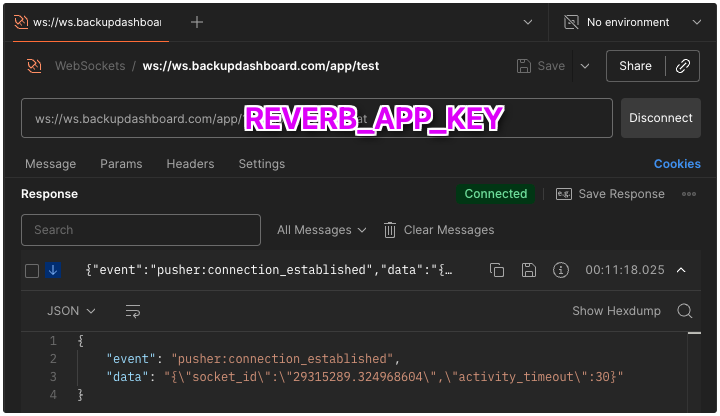
Postman is your friend to eliminate if it actually works. See screenshot idea and how to structure the URL
Caching is your enemy - you might make changes to the keys and end up with cached data meaning you get nowhere.
Longer version:
Study the server block on the Forge server to understand "reverse proxy".
When the Forge 2026 server asks you to deploy a new site, it defaults to 8080.
Listen, not 80, but proxy, not SSL, but 8080. See below.
server {
    listen 80;
    listen [::]:80;
    server_name ws.backupdashboard.com;
    server_tokens off;

    # FORGE SSL (DO NOT REMOVE!)
    # ssl_certificate;
    # ssl_certificate_key;

    ssl_protocols TLSv1.2 TLSv1.3;
ssl_ciphers ECDHE-ECDSA-AES128-GCM-SHA256:ECDHE-RSA-AES128-GCM-SHA256:ECDHE-ECDSA-AES256-GCM-SHA384:ECDHE-RSA-AES256-GCM-S
HA384:ECDHE-ECDSA-CHACHA20-POLY1305:ECDHE-RSA-CHACHA20-POLY1305:DHE-RSA-AES128-GCM-SHA256:DHE-RSA-AES256-GCM-SHA384;
ssl_prefer_server_ciphers off;
ssl_dhparam /etc/nginx/dhparams.pem;

    add_header X-Frame-Options "SAMEORIGIN";
    add_header X-XSS-Protection "1; mode=block";
    add_header X-Content-Type-Options "nosniff";

    charset utf-8;

    # FORGE CONFIG (DO NOT REMOVE!)
    include forge-conf/2981799/server/*;

    access_log off;
    error_log  /var/log/nginx/ws.backupdashboard.com-error.log error;

    location / {
        proxy_http_version 1.1;
        proxy_set_header Host $http_host;
        proxy_set_header Scheme $scheme;
        proxy_set_header SERVER_PORT $server_port;
        proxy_set_header REMOTE_ADDR $remote_addr;
        proxy_set_header X-Forwarded-For $proxy_add_x_forwarded_for;
        proxy_set_header Upgrade $http_upgrade;
        proxy_set_header Connection "Upgrade";

        proxy_pass http://0.0.0.0:8080;
    }

    location ~ /\.(?!well-known).* {
        deny all;
    }
}
Don't trash the config. The APP KEY and SECRET is trashed as well!
Use Postman to test:
The big bad SSL question because after all this trouble still:
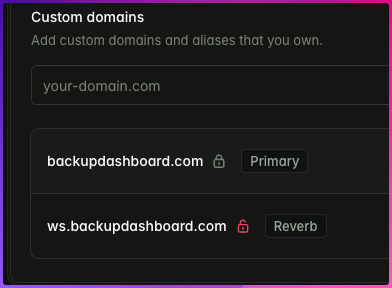
It turns out port 80 DOESN'T WORK. You have to use 443.
SSL
If an SSL certificate exists for your site which protects Reverb’s configured hostname, Laravel Forge will automatically install it when enabling Reverb, ensuring your Reverb server is accessible via secure WebSockets (wss).If Reverb is installed before a valid certificate is available, you may request a new certificate for Reverb’s configured hostname from your site’s “SSL” tab. Laravel Forge will automatically configure secure WebSockets for Reverb as soon as the certificate is activated. Forge will also pre-populate the “Domains” SSL form input with Reverb’s hostname when requesting a certificate.After activating SSL on a Reverb-enabled site, you should ensure the following environment variables are properly defined before redeploying your site:
REVERB_PORT=443
REVERB_SCHEME=https

VITE_REVERB_PORT="${REVERB_PORT}"
VITE_REVERB_SCHEME="${REVERB_SCHEME}"

MIX_REVERB_PORT="${REVERB_PORT}"
MIX_REVERB_SCHEME="${REVERB_SCHEME}"